> ## Documentation Index
> Fetch the complete documentation index at: https://langchain-5e9cc07a-preview-ramonn-1789138246-3410f5f.mintlify.site/llms.txt
> Use this file to discover all available pages before exploring further.
# Use subagents in Deep Agents Code
> Define custom Deep Agents Code subagents as AGENTS.md files with YAML frontmatter. Covers project and user paths, optional model overrides, and examples.
Define custom synchronous [subagents](/oss/python/deepagents/subagents) as markdown files so Deep Agents Code can delegate specialized tasks to them.
Async subagents are not available to end-users in Deep Agents Code at this time.
Each subagent lives in its own folder with an `AGENTS.md` file:
```text theme={null}
.deepagents/agents/{subagent-name}/AGENTS.md # Project-level
~/.deepagents/{agent}/agents/{subagent-name}/AGENTS.md # User-level
```
Project subagents override user subagents with the same name (see [precedence rules](/oss/deepagents/code/configuration#subagents)).
## Continue the parent conversation
The built-in `general-purpose` subagent inherits the parent agent's conversation and system prompt. This context lets delegated work continue without repeating the investigation, decisions, or other details already established in the parent conversation.
To run the built-in `general-purpose` subagent in isolated mode instead, set the following variable in your shell or global `~/.deepagents/.env`:
```bash theme={null}
export DEEPAGENTS_CODE_FORKED_SUBAGENTS=false
```
The frontmatter requires `name` and `description` (same as the [`SubAgent` dictionary spec](/oss/python/deepagents/subagents#subagent-dictionary-based)). The markdown body becomes the subagent's `system_prompt`. In addition to the base spec, `AGENTS.md` files support an optional `model` frontmatter field that overrides the main agent's model for this subagent. Use the `provider:model-name` format (e.g., `anthropic:claude-opus-4-8`, `openai:gpt-5.5`). Omit it to inherit the main agent's model.
Other `SubAgent` fields (`tools`, `middleware`, `interrupt_on`, `skills`) are currently not configurable via `AGENTS.md` frontmatter—custom subagents defined this way inherit the main agent's tools. Use the SDK directly for full control.
## File format
Subagent `AGENTS.md` files use YAML frontmatter followed by a markdown body:
```markdown theme={null}
---
name: researcher
description: Research topics on the web before writing content
model: anthropic:claude-haiku-4-5-20251001
---
You are a research assistant with access to web search.
## Your Process
1. Search for relevant information
2. Summarize findings clearly
```
## Dynamic subagents
`dcode` ships with the code interpreter enabled, so [dynamic subagents](/oss/python/deepagents/dynamic-subagents) work out of the box.
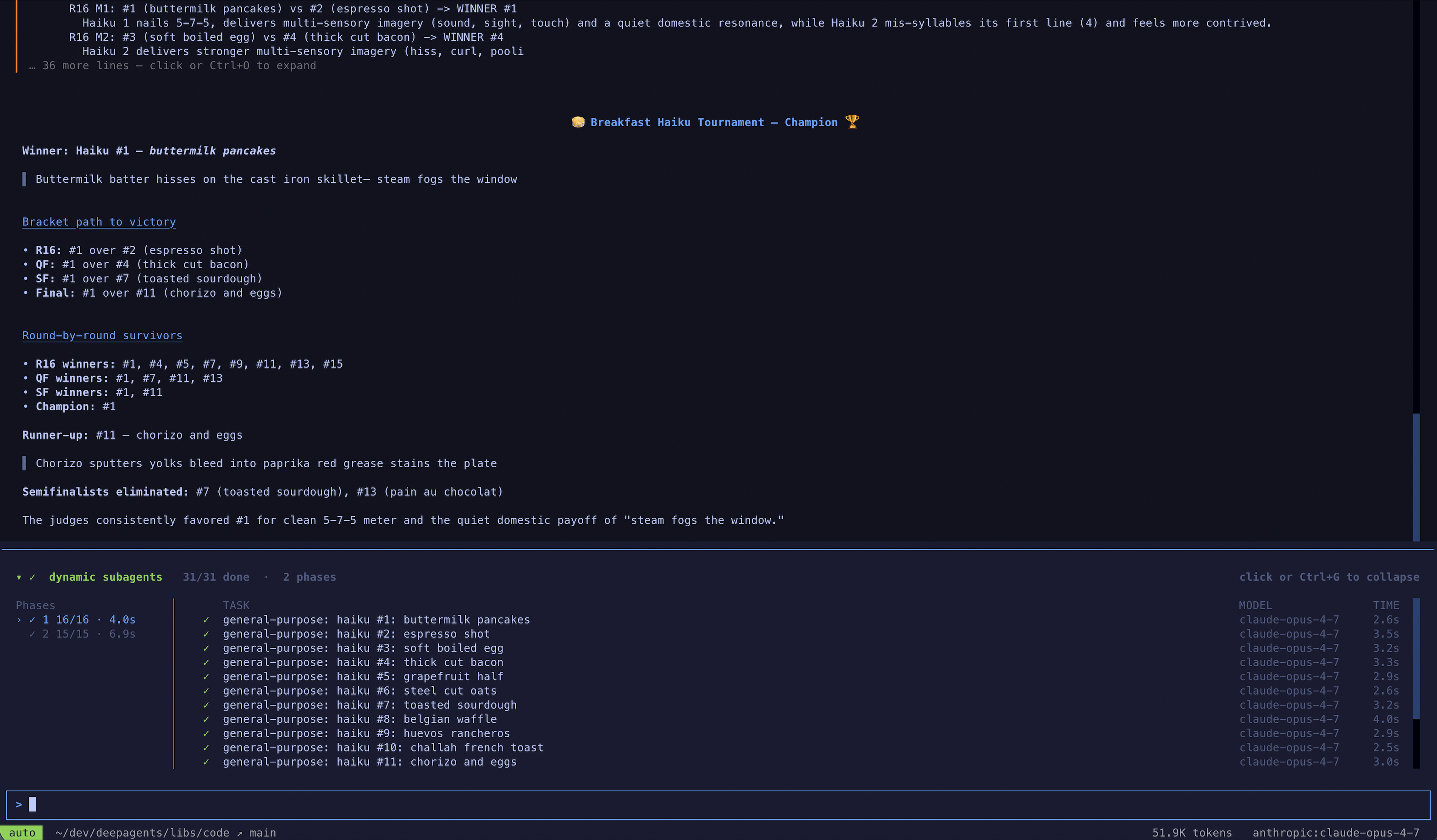
To trigger dynamic subagents, ask for a "workflow". Instead of doing the work itself or managing fan-out through its native `task` tool, the agent writes an orchestration script that calls the built-in `task()` global and runs it in the code interpreter. For example: "Run a workflow to review every file in src/ for SQL injection."
As subagents spawn, `dcode` shows them live in the dynamic subagents panel, grouped into phases by dispatch.
 You can also use dynamic subagents in the coding agent of your choice over [ACP](/oss/python/deepagents/acp) (for example, Zed).
## Example: cost-efficient subagents
Use a cheaper, faster model for simple delegation tasks while keeping the main agent on a more capable model:
```markdown theme={null}
---
name: general-purpose
description: General-purpose agent for research and multi-step tasks
model: anthropic:claude-haiku-4-5-20251001
---
You are a general-purpose assistant. Complete the task efficiently and return a concise summary.
```
This overrides the built-in general-purpose subagent, routing all delegated tasks to a cheaper model. See [Override the general-purpose subagent](/oss/python/deepagents/subagents#override-the-general-purpose-subagent) for more.
***
You can also use dynamic subagents in the coding agent of your choice over [ACP](/oss/python/deepagents/acp) (for example, Zed).
## Example: cost-efficient subagents
Use a cheaper, faster model for simple delegation tasks while keeping the main agent on a more capable model:
```markdown theme={null}
---
name: general-purpose
description: General-purpose agent for research and multi-step tasks
model: anthropic:claude-haiku-4-5-20251001
---
You are a general-purpose assistant. Complete the task efficiently and return a concise summary.
```
This overrides the built-in general-purpose subagent, routing all delegated tasks to a cheaper model. See [Override the general-purpose subagent](/oss/python/deepagents/subagents#override-the-general-purpose-subagent) for more.
***
[Connect these docs](/use-these-docs) to Claude, VSCode, and more via MCP for real-time answers.
[Edit this page on GitHub](https://github.com/langchain-ai/docs/edit/main/src/oss/deepagents/code/subagents.mdx) or [file an issue](https://github.com/langchain-ai/docs/issues/new/choose).